The sidebar isn't very useful if you can't use the objects in your game.
Any projects in the engine have access to the $get(...)Copy Javascript
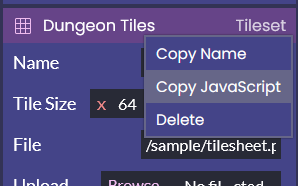
You can then paste this into your code to use the object in your code.
You can then interact with the object directly,
$get('Tilemap::Dungeon Map').offset.x += 1;
Although if you're using the object in multiple places (which you will be almost all of the time), you should instead store it as a variable.
const dungeonMap = $get('Tilemap::Dungeon Map')

dungeonMap.offset.x += 1;
Now that you're familiar with using objects, it's time to start making your game.
Optional: Sharing objects between files
Next: The Game Loop